In reply to Kim and others who have asked...
Adding ABC widget.
ABC have premade widgets and the facility to make your own.
Follow hyperlink to ABC site.
Choose items for your widget.
Click on Get this widget today.
(At this point you can choose to publish straight way by clicking the blogger icon but you have to submit password. I did not choose this option.)
Copy embed code.
Go to the design section in your blog.
Click on add gadget.
Click on HTML/Java script.
Paste in embed code.
Click save.
Click on preview if you want to check.
Click save.
You should now have the widget on your blog.
I have tried this method to embed other widgets and it has always worked.
A word of caution though...if your followers have a slow internet connection, widgets can slow the page loading time.
Hope this has helped
Juliet
Friday, August 20, 2010

Thursday, August 19, 2010
Google Earth and Google Maps
Google Earth is a great place to gain information about the world and universe we live in. It is current and up to date.
Twenty-three intereting ways to use google earth in the classroom

Google Maps
The advantage of google maps is that you do not have to download the software on to your computer. Google maps is not just for locating places, but by using the edit facility, maps can be personalised, placemarks and images added and routes highlighted. This enables the students to interact with the maps and they can make their own map of their neighbourhood, create a walking tour, identify the features in their surrounds. Data such as population and employment can be collected and added to the maps. I did have a brief play and found it not too difficult to use...but like all of the digital tools a little time consuming at first.
Flickr maps
Have a look....maps and images.
Twenty-three intereting ways to use google earth in the classroom
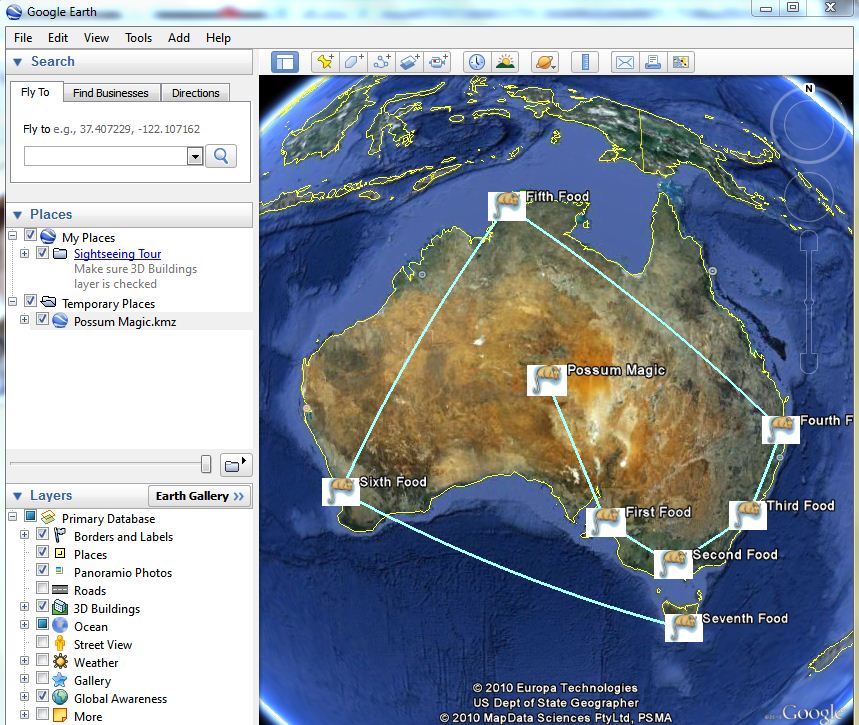
This image is of a googlelittrip made from Mem Fox's Possum Magic.
Google Maps
The advantage of google maps is that you do not have to download the software on to your computer. Google maps is not just for locating places, but by using the edit facility, maps can be personalised, placemarks and images added and routes highlighted. This enables the students to interact with the maps and they can make their own map of their neighbourhood, create a walking tour, identify the features in their surrounds. Data such as population and employment can be collected and added to the maps. I did have a brief play and found it not too difficult to use...but like all of the digital tools a little time consuming at first.
Flickr maps
Have a look....maps and images.
Wednesday, August 18, 2010
Skype
Skype

I love skype. In the past have used it when travelling overseas to keep in contact with family and friends and now that im not traveling to keep in contact with my overseas friends. With skype I have been able to maintain friendships which would have suffered from time differences and distance.
Last year I studied an ESL course via flex and all of our tutorials were done via skype conference call. Flex can be quite an isolated way to study but by using skype we were able to talk directly to our tutor and fellow students and listen to other peoples questions and ideas.
More recently for our group assignments, skype has been crucial for our group as we all had time and distance constraints. We were able to conference, share our ideas, swap files, look at the same material at the same time and work together just as we would if we were sitting at uni.
In an school class setting, students would be able to meet students from all over the world, perhaps students they were doing a project with on a wiki for example. The teacher and the class could liaise with students who were away from class because of illness or traveling. Students could be able to make contact with authors or be lucky enough to chat with a politician. There are lots of possibilities.
Teachers could use skype for collaboration with other teachers and for professional development courses.
So many possibilities with skype...
Thursday, August 12, 2010
Word clouds
I really like word clouds. They are a graphic representation of words which I find visually appealing and interesting. Wordles are amongst many things a great way of creating vocab walls and fact sheets, display inspirational quotes, for starters.
For some wordle ideas have a look at these websites
http://www.brighthub.com/education/k-12/articles/58905.aspx
http://thecleversheep.blogspot.com/2008/10/top-20-uses-for-wordle.html
I have seen wordle used to great effect in a Year 1/2 class for practicing their spelling words.

I thought I would experiment with a few word clouds other than wordle.
For some wordle ideas have a look at these websites
http://www.brighthub.com/education/k-12/articles/58905.aspx
http://thecleversheep.blogspot.com/2008/10/top-20-uses-for-wordle.html
I have seen wordle used to great effect in a Year 1/2 class for practicing their spelling words.
a worlde of my blog

e learning - Word cloud - WordItOut


I like tag clouds such as Tagul. They are great on websites and wikis as the words are often hyperlinked to something associated with the word.
arts blog blogthis bp buzz classroom clips comments created design different easy email engage facebook fun google happened home images juliet learning literacy maker movie oil online photo picnik pm podcast posted powerpoint process program really science share spill students technology text textorizer think tool twitter unit used visual yes
created at TagCrowd.com
Movie Maker
Within the movie maker program, text, images, movies, audio, animations, transitions can all be added and manipulated to create a movie, to tell a story.
In an educational setting, it is an engaging tool and can be used to create a movie for an assessment or culminating task to demonstrate learning. It's use promotes higher order thinking as students design and create an original products. Movie maker increases a student's visual literacy as they need to understand the codes required to tell a story by way of moving images. It allows them to reach an audience, share their work and receive feedback.
I made this movie for my arts assignment last year. It was the first time I had used movie maker and while I found the program very easy to use, it was the creativity required to tell my arts journey that was the difficult part. In the end, after many false starts, I created a product that I was very proud of and am pleased to share. Please enjoy.
In an educational setting, it is an engaging tool and can be used to create a movie for an assessment or culminating task to demonstrate learning. It's use promotes higher order thinking as students design and create an original products. Movie maker increases a student's visual literacy as they need to understand the codes required to tell a story by way of moving images. It allows them to reach an audience, share their work and receive feedback.
My Arts Journey
I made this movie for my arts assignment last year. It was the first time I had used movie maker and while I found the program very easy to use, it was the creativity required to tell my arts journey that was the difficult part. In the end, after many false starts, I created a product that I was very proud of and am pleased to share. Please enjoy.
Monday, August 2, 2010


Fruit and Vegetable Decomposition, Time-lapse
More Time Lapse videos and other Fun Videos at NeoK12.com
This clip is suitable for a science unit, life and living.
youtube clips are effective in the classroom as hooks into the lesson or unit. In saying that there is a danger in over using it and relying on the students to engage. Personally I am becoming desensitised to clips on future learning as they have been used over and over again through out our university courses.
youtube clips are effective in the classroom as hooks into the lesson or unit. In saying that there is a danger in over using it and relying on the students to engage. Personally I am becoming desensitised to clips on future learning as they have been used over and over again through out our university courses.
Podcasting
Warning - turn off sound or mute podcast.
Firstly I shall talk about the process of creating the podcast. Not so difficult to follow but not without it's glitches. I recorded several times and was rewarded by a blank playback - time consuming and annoying. Finally I was recorded and duly published my podcast... I thought my work was over. I grabbed the embed code, to place the podcast in my blog, and clicked no on the box which said start playing automatically. It seems no means yes and yes means yes. Annoying - yes. Time consuming - Yes. I had wanted to post directly into my blog but I think for the sake of my blog followers I shall post an image of my podcast and link directly to it online.
Firstly I shall talk about the process of creating the podcast. Not so difficult to follow but not without it's glitches. I recorded several times and was rewarded by a blank playback - time consuming and annoying. Finally I was recorded and duly published my podcast... I thought my work was over. I grabbed the embed code, to place the podcast in my blog, and clicked no on the box which said start playing automatically. It seems no means yes and yes means yes. Annoying - yes. Time consuming - Yes. I had wanted to post directly into my blog but I think for the sake of my blog followers I shall post an image of my podcast and link directly to it online.
My actual podcast is a reading of Mr McGee Goes to Sea by Pamela Allen. I think a great way to use podcasting in the classroom is to have audio books, especially for struggling readers. It could be used in a literacy rotation class, as extra support, for reading groups. Podcasting addresses the different learning styles in class.Another great aspect of podcasts is that it is available to the students 24/7 and can be accessed at home ensuring that learning does not only happen in the classroom.
http://jubenjae.podomatic.com/
I posted this podcast to show that podcasts could include visual images. I like this particular one as I think the maths is clearly explained and really engaging for the students. It is something they could do at home though the chocolate might not last for the entire maths factor family.
Subscribe to:
Posts (Atom)